
Reporting
Built For


Inventory reports software
When you go to a really good burger joint have you noticed they’ll generally have their own creations listed – combinations you might not have thought of on your own – and, they have build-your-own option.
So then, why is it that the handful of reports that come with most software many times seems like the reports were an after-thought just thrown in to satisfy a “we have reports requirement?”
The ones they’ve created are based on their expertise – they make a lot of burgers and think of things us “just give me a cheeseburger” types might not think of. But, if you have something you specifically want, you can customize your burger however you want it.
Expert-advice AND the options to customize – always a good thing.

Reports and documents the Acctivate way

Acctivate includes over 100 reports & documents out of the box including a customizable dashboard AND the ability to create virtually any report or document with Crystal Reports® eliminating all restrictions to getting the information you need, the way you want it. Acctivate provides fully-integrated, real-time access to company-wide information.
- Over 100 standard reports & documents out of the box
- All reports and documents can be previewed on screen before printing
- Integrated with the world’s leading reporting software, Crystal Reports®
- Create customized documents with rich content & professional design elements
- Organize & manage all reports in the Acctivate Report Catalog
- Easily distribute information in popular file formats
- Print display grids by simply clicking with the right mouse button
- Print any screen by clicking on the print screen button on the toolbar
Acctivate inventory reports software, Eclipse Aesthetics

Access the information you need
With over 70 standard reports & 30 standard documents, Acctivate users can easily access information from across the organization on day one.
- Reports are easily accessible within each category module (sales, purchasing, etc.) and are also housed within the Report Catalog, a system library that contains all reports and documents
- Report filtering: Report data can be filtered to limit what is presented to achieve a more customized user view of the information
- Printer assignments define a default printer for each report
Acctivate inventory software with custom reporting user, St. Jude Candle Company
Acctivate inventory software with custom reporting user, ProTac
Customize with Crystal Reports®
Acctivate’s reporting and document management capabilities were designed around Crystal Reports, the powerful, industry-standard business reporting software.
From barcodes for product or bin labeling to advanced, rich content reports and documents with professional design quality & branding – the data collected in Acctivate is quickly & easily converted into actionable information and interactive content.
- Virtually any report or document that you can envision can be created with Crystal Reports using any data housed within Acctivate
- Standard reports & documents can be modified for specific business needs & customized with branding elements, images, font type, font size and text color
- Documents, such as purchase orders, sales orders and invoices can be customized and branded
- Create and print barcodes for product labeling and/or bin labeling
Acctivate inventory software with custom reporting user, The Lone Grazer Creamery
Organize with the report catalog
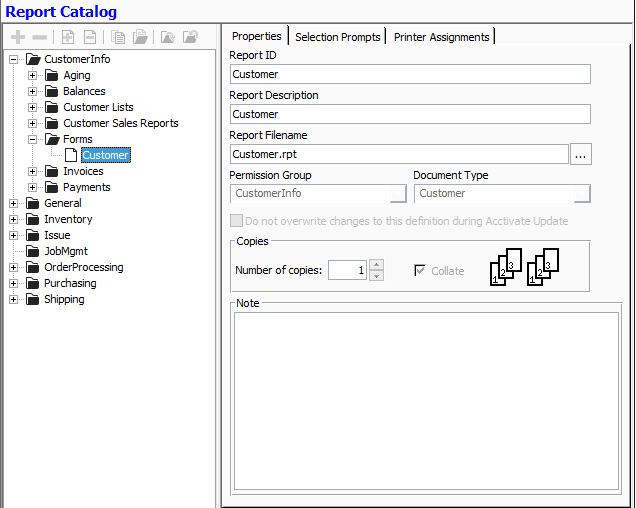
The report catalog is a repository of all standard and custom reports in the system.
Reports are organized in a visual tree structure, with folders and sub-folders organized in logical groupings.
Acctivate inventory software with custom reporting user, Pigs Unlimited
Distribution
Acctivate reports & documents can easily be converted and attached to an email, posted on an intranet or used on the web.
Reports & documents can be exported into any of the following formats:
- Acrobat Format (PDF)
- Crystal Reports (RPT)
- HTML 3.2 and 4.0
- MS Excel 97-2000
- MS Excel 97-2000 (Data only)
- MS Word
- ODBC
- Separated Values (CSV)
- Tab-separated text
- Text
- XML
- Record style (columns no spaces)
- Record style (columns with spaces)
- Report Definition
- Rich Text Format
Acctivate inventory software with custom reporting user, Bison Supply
Call us at 817-870-1311